
软件百科中的词条内容仅供参考,如果您需要解决具体问题(尤其在法律、医学等领域),建议您咨询相关领域专业人士。
您的位置:极速下载站 → 百科首页 → 应用程序 → Auslogics Disk Defrag
Auslogics Disk Defrag
软件简介
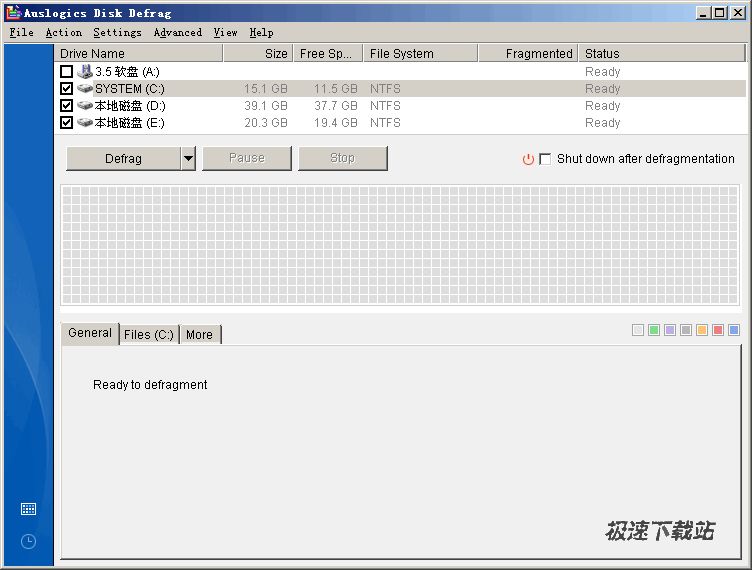
我们都知道定期整理磁盘碎片的意义。但是,该用什么工具呢?系统自带的老牛慢车似的磁盘碎片整理程序?破解版的O&O?Vopt,还是Diskeeper?为什么不考虑免费且高效的德国工匠出品——AusLogics Disk Defrag?没有任何复杂的参数设置,非常简便,整理速度极快,而且提供完整的整理报告。
Disk Defrag is FREE for home users, yet supplied with advanced disk optimization techniques that only paid analogs have. This allows Disk Defrag to stand out from its major competitors as the most efficient disk defragmenter.But for even better performance gain for your PC, upgrade to Auslogics BoostSpeed. It includes Disk Defrag with its every feature and advantage, plus over 18 tools for complete computer maintenance and optimization.
软件截图
软件特性
Optimizes file system
Disk Defrag will speed up your computer by moving system files to the fastest part of the disk. It will also move data files from the MFT Reserved Zone to prevent MFT fragmentation.
Consolidates free space
In addition to defragmenting your files, Disk Defrag can defragment free disk space. The free space is merged into a large contiguous block, which is an effective way of preventing file fragmentation.
Can defrag automatically
This feature ensures that file fragmentation is eliminated as soon as it occurs. You can set Disk Defrag to run automatically when your system goes idle. The program will analyze the disks and defragment them in the background if required.
Provides flexible scheduler
Defragmentation yields better results when it is performed on a regular basis. Disk Defrag is supplied with a flexible scheduler that will help you to schedule defragmentation according to your needs.
Can defrag a single file or folder
Have no time for defragmenting the entire hard drive? With Disk Defrag you can defragment a single file, several files or a folder.
Supports multi-terabyte volumes
Disk Defrag is supplied with a powerful engine that can easily defragment large multi-terabyte volumes. It can also defragment several drives at once, which makes the defragmentation process a lot faster.
Compact & Fast
Smart defragmentation algorithms allow Disk Defrag to run much faster than similar defragmenters and consume less system resources.
更新历史
使用帮助
Where to use?
Portable defragmenter can be handy if you have no rights for installing any software on your office computer or if you want to help your parents and friends to maintain their PCs. IT professionals who deal with hundreds of computers may find this program useful as well.
The major benefit of regular disk defragmentation is certainly its ability to recover computer performance and thus improve employee productivity. But there is a number of other advantages that can be gained with the help of defragmentation:
Saving system administration time
Badly fragmented systems tend to cause numerous problems like applications freeze-ups, slow boot times and slow response. When that happens, IT department professionals require quite a lot of time to troubleshoot the problem. Defragmenting disks on a regular basis can prevent many of these issues, so system administrators would have more time for other tasks.
Prolonging disks life
Apart from causing slowdowns, fragmentation makes the disk drive heads move too much when reading files. This contributes towards disk drive wear and tear. Defragmentation puts files back together and prolongs hard drives lifetime.
Recovering lost data
No one can feel totally protected from data loss due to disk breakdowns or accidentally deleted files. When this happens, data can usually be restored with special recovery software. Defragmentation can improve data recovery results because there is a higher possibility of recovering a contiguous file rather than its numerous fragments spread all over the disk.
关于开发商
Auslogics Software Pty Ltd is a leading developer and publisher of computer maintenance and optimization software for Microsoft Windows. It is a fast-growing privately owned company located in Sydney, Australia. The Auslogics team is composed of bright, driven and passionate people working hard to provide you with the best computer maintenance tools.